
From bike ride to wedding dance
A cycling portrait becomes a wedding dance clip. The man steps forward, lifts a hand to his mouth, looks at the camera and turns away.
How this sample was made
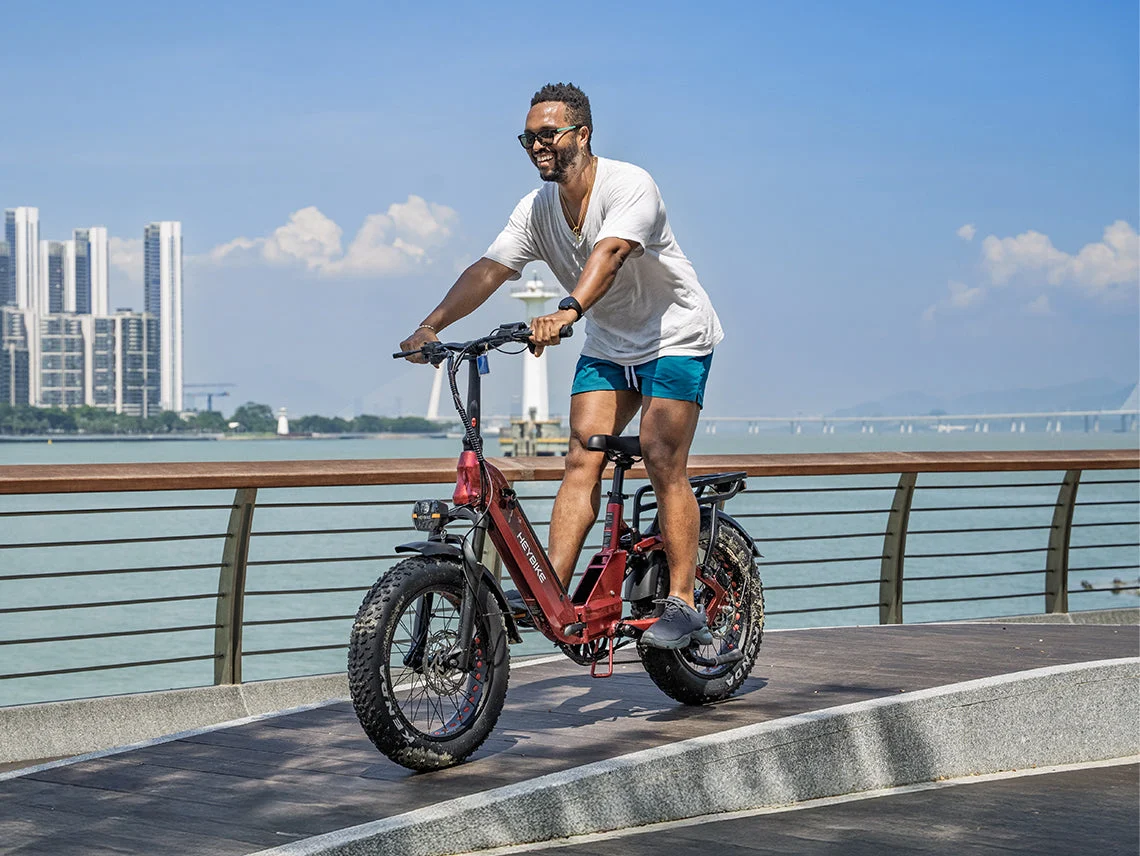
We uploaded one photo of a man on a bicycle and used the first five seconds of the wedding entrance dance as the motion reference. The reference sets the scene, camera and order of moves: bite food, a brief serious look at the camera, then turn away. The photo supplies the performer. A first attempt changed his white T-shirt into a collared top, so a second prompt pass asked for the plain round-neck T-shirt and a neutral expression.
- Model
- Seedance 2 Mini
- Length
- About 5 seconds
- Output
- 480p · Sound on
- Reference template
- Wedding entrance dance
- Generated on
- 2026-10-21
- Actual file dimensions
- 496 × 864
- Requested framing
- 9:16 vertical
This is a sample made by our team, not a customer result. Motion follows the reference in order but not frame by frame, and results vary with the photo you upload.
Make your own version
Upload your own photo, choose a dance setting and generate your own clip.
Motion reference video
This is the source dance reference, not the generated result above. The sample output is about five seconds; the reference preview can be longer.
Explore the photo-to-video workflow
From a cycling photo to a wedding dance video
This case study follows one adult portrait through a photo-to-video generation test. The input shows a man on a bicycle in daylight. The output places a version of that man in a wedding dance scene, using a separate entrance clip to guide the movement. We wanted to check three things together: whether the face remained recognizable, whether a plain white T-shirt survived the change of pose, and whether the dance followed the reference action. This is a team-generated Dime Dime Baby AI sample. It is useful evidence for a short wedding dance edit, but it does not establish that every photo will produce the same identity, clothing or timing.
What the input photo contributes
The cycling photo supplies the intended performer, including his face, dark glasses, hair, facial hair, white T-shirt and blue shorts. It does not supply a dance sequence. A still image cannot show how the unseen side of a body looks during a turn, so those views must be generated. The bicycle, waterfront and railing are features of the source photo rather than requirements for the wedding scene. For your own image-to-video attempt, choose a photo with one clearly visible adult and enough body detail for the action you want. If an object crosses the face or limbs, the model has less visual evidence when reconstructing movement. A sharp face alone does not guarantee stable hands, glasses or clothing throughout the clip.
How the wedding entrance reference guides motion
The wedding entrance template provides the movement and camera context. Our sample used the opening five seconds as the motion reference, rather than asking the model to invent a complete dance from a sentence. The intended sequence includes approaching the camera, raising a hand toward the mouth, a brief direct look and a turn away. The reference preview on this page is a separate source asset, so its total running time can exceed the generated sample. Compare the order of actions rather than expecting identical frames. Dual-reference video generation combines the photo and the dance footage in one new scene; it is not a literal cutout pasted over the original dancer. Background people, body position and framing can therefore change.
Try this photo-to-video setupPrompt direction: face, clothing and expression
The first man-and-wedding attempt changed the plain T-shirt into a collared top. A second prompt pass strengthened the request for a white round-neck T-shirt and a neutral expression. The video shown here is that selected result. This detail matters because a prompt can describe an important attribute without guaranteeing it will survive every frame. When adding extra direction in the generator, focus on the visible trait that matters most: keep the same glasses, retain the shirt neckline, or avoid a broad smile. Treat this paragraph as a description of our prompt intent, not an exact prompt transcript or a reusable promise. The selected dance template already supplies the action context, so a long list of unrelated changes can make a result harder to judge.
What to inspect in the five-second result
Play the full output and compare the face at the start, during the hand movement and through the turn. Look at the shirt collar, sleeve edges, glasses and fingers as separate details. A convincing opening frame can hide a change later in an AI dance video. The stored file is 496 by 864 pixels and about 5.09 seconds long; the generation settings requested the 480p tier and vertical 9:16 framing. These values describe this sample, not every future export. This particular example has audio, while previews initially play muted. Turn on sound if you want to evaluate the audio track. Do not infer that the reference soundtrack has been transferred or that every model and setting includes audio.
Try the same photo-to-video setup
Open the generator from this page to start with the party-hall scene associated with the wedding entrance reference. Upload a photo you have permission to use, then inspect the selected dance and the current duration, resolution, framing and credit quote. The default new draft is five seconds, but a restored draft can retain earlier choices. Confirm the visible settings before submitting. Add one short clothing or expression note if you need it, and watch the returned video before planning another attempt. You are creating a new result from your own photo; opening this setup does not duplicate our stored output or preload our input image as your upload. Availability and the final charge follow the current tool quote.
Try this photo-to-video setupWhere a wedding dance sample fits
This type of short portrait animation can help you explore a wedding-themed joke, a dance invitation concept or a personal social clip. Keep the AI origin clear when you share it, especially if the person never performed the dance. The example demonstrates a change from a cycling setting to an event setting, not authentic footage of the man attending that event. For a different background, compare the garden party case, which keeps the same broad dance source while intentionally changing the venue. For a pet version, the dog dance generator uses the same photo-and-motion workflow with pet-focused guidance. Comparing those cases helps separate a change of performer from a change of scene before you spend credits on a new attempt.
Open the dog dance video generatorQuestions about this AI video sample
Is this a photo-only animation or a dual-reference video?
It is a dual-reference example: an adult photo supplies the subject and a wedding dance video supplies the motion reference. Text adds direction about the intended appearance. A photograph alone does not contain the choreography. The source preview and the generated output are labeled separately on this page so you can compare what was provided with what the model returned.
Will my face and outfit stay exactly the same?
Exact preservation is not guaranteed. Our first attempt changed the neckline, which is why the selected version used stronger clothing direction. Check your own result during movement and turns, not only on the thumbnail. If one attribute is wrong, revise that attribute in a new attempt instead of assuming the same prompt will always produce an identical face or outfit.
Why does this sample start without sound?
The page starts video previews muted to keep browsing comfortable. This man-party file has an audio track, so you can enable sound with the player controls. Other examples on the site are explicitly silent. A dance reference is not a promise to copy its music, and audio availability should be checked in the selected tool settings and returned file.
What should I check before paying for another attempt?
Identify the specific problem first: identity, clothing, camera position, movement order or sound. Then check that both the photo and the intended dance are selected. Review the live price before generating again. A failed-task credit return and a cash refund are different matters; use the current pricing and policy pages for those rules rather than treating an unsatisfactory artistic result as a guaranteed refund.