
A garden party at sunset
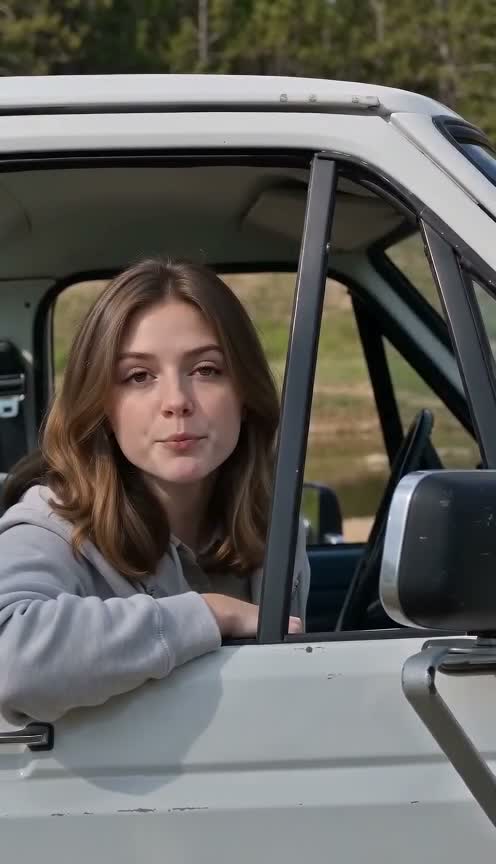
The woman keeps her brown hair and grey hoodie. Wedding dance moves guide the action while the scene changes to a garden party at sunset.
How this sample was made
We used the same five-second wedding entrance dance as the motion reference but asked for a different scene: a garden party at sunset. The photo keeps the woman’s face, brown shoulder-length hair and grey hoodie. Her lower body is not visible in the photo, so the prompt specified dark jeans and plain sneakers. The camera ended up slightly tighter than in the reference, so this sample is not a scene-preserving test.
- Model
- Seedance 2 Mini
- Length
- About 5 seconds
- Output
- 480p · Silent display
- Reference template
- Wedding entrance dance · Garden remix
- Generated on
- 2026-10-21
- Actual file dimensions
- 496 × 864
- Requested framing
- 9:16 vertical
This is a sample made by our team, not a customer result. Motion follows the reference in order but not frame by frame, and results vary with the photo you upload.
Make your own version
Upload your own photo, choose a dance setting and generate your own clip.
Motion reference video
This is the source dance reference, not the generated result above. The sample output is about five seconds; the reference preview can be longer.
Explore the photo-to-video workflow
A portrait becomes a garden party dance
This sample explores a scene change as well as a new performer. The input is a portrait of a brown-haired woman leaning at a car window in a grey hoodie. We paired it with a wedding entrance dance reference, then asked for a garden party at sunset. The purpose was to see whether the movement could guide a newly generated setting while the woman remained recognizable. It is a team-made photo-to-video example, not footage of her at a real party. Unlike a strict background-preservation test, this attempt intentionally changes the location, lighting and part of the composition. Those differences are part of the brief and should be assessed separately from identity or motion errors.
Choosing a portrait for a full-body dance
The input clearly shows the face, shoulder-length brown hair and grey hoodie, but it does not show the complete lower body. To make a dance scene, the model has to create information that is absent from the photo. Our direction specified dark jeans and plain sneakers rather than leaving those details entirely open. This is an important limit of portrait-to-video generation: the resulting trousers and shoes are generated additions, not recovered details from the original image. For your own AI dance video, a wider source photo can give the model more evidence about proportions and clothing. If you use a close portrait, decide which missing details are important and expect to inspect them in the finished clip.
Reusing the wedding dance in a new setting
The motion input was the same wedding entrance dance used in the man-party sample, with an opening five-second reference segment. It supplies an action sequence and a camera idea even though the requested output moves to a garden. The still photo is the identity reference; the video is the motion reference. Giving those inputs different roles helps explain what a dual-reference generator is doing. It generates a new interpretation rather than preserving the original wedding footage underneath a replacement face. A sunset garden can introduce different colors, background objects and lighting on the performer. Compare the sequence of gestures with the source, but do not expect every shoulder position, cut or camera distance to match the reference exactly.
Try this photo-to-video setupPrompt intent for the sunset garden remix
The creative direction asked for a garden party at sunset while keeping the woman's face, brown hair and grey hoodie. It also supplied the dark-jeans and sneaker details missing from the source portrait. These are the main choices behind the example, not a claim that a single sentence controls every aspect of the result. When trying a similar scene remix, describe the venue and a few visual anchors that should remain. If you ask for different weather, clothing, camera motion and choreography at once, it becomes difficult to identify why a result changed. The tool's extra direction field is best used to clarify the chosen template. It does not turn a generated scene into a deterministic reconstruction of a planned shot.
Check framing, identity and the silent output
The returned framing is slightly tighter than the dance reference, so this example should not be read as evidence of exact camera preservation. Watch the face during turns and compare the grey hoodie, hair outline and newly generated lower body. Then look at the garden setting separately: does it read as the requested event scene, and do foreground and background move plausibly together? The sample was requested at five seconds, 480p and vertical 9:16. Its actual file is about 5.09 seconds and 496 by 864 pixels. It is presented as a silent result. If the reference player contains sound, that does not change the output file's audio status or mean the original soundtrack was included.
Make your own garden dance video
Use the tool link on this page to open the garden scene setup, then upload a permitted photo. Check the selected reference dance before submission: choosing a location and choosing a movement are related controls, but they describe different parts of the result. Review the live model, length, resolution and credit quote, including any settings restored from an earlier draft. New requests default to five seconds. If your source is cropped above the legs, add a brief note about the lower-body clothing you want and keep the scene direction focused. After generation, review the complete clip before making another change. The link prepares a starting selection; it does not upload the woman's photo or promise to reproduce our exact garden composition.
Try this photo-to-video setupCompare a scene remix with a performer replacement
A garden party video can be useful for a lighthearted invitation concept, a personal celebration edit or a short visual mood test. Label it as AI-generated when sharing, and use only a person's image you are entitled to use. The value of this case is the comparison: the man-party example keeps a wedding context, while this one uses related dance motion in a deliberately different venue. If your main goal is preserving a location, study that distinction before choosing a scene remix. The pet wedding and two-animal cases show a further change, where animal anatomy and character count introduce separate limitations. Internal links below let you compare those outputs before deciding which generator setup best fits your own photo.
Open the dog dance video generatorQuestions about this AI video sample
Why is the reference a wedding video if the result is a garden?
We used the wedding clip for movement and asked for a different setting in the text direction. The output is therefore a scene remix, not a claim that the reference venue was preserved. This combination is one use of photo-plus-video generation: the portrait guides the performer, the clip guides motion, and the written request describes a new environment.
Can a head-and-shoulders photo become a full-body video?
The model can generate a wider body view, but unseen details are inventions. In this example we requested dark jeans and sneakers because the source image did not reveal them. A wider input photo may provide more useful clothing and proportion information. Review the complete result for changes in hands, legs and posture rather than relying only on the source face.
Does the garden video include the reference music?
This sample is silent. The separate reference preview is provided so you can inspect the dance, and its audio is not evidence of audio in the generated result. If sound is essential to your project, check the currently selected model and audio settings in the generator, then listen to the downloaded output before using it in an edit.
What should I change if the framing is too close?
First confirm the chosen scene and dance, then add a short camera-distance direction for a new attempt. Keep the identity and clothing notes stable so you can judge the effect of that change. Framing remains an AI interpretation, and this sample already shows a tighter crop than its reference. Check the current credit quote and relevant policies before submitting another generation.