The viral BbY WOW dance trend

Dime Dime Baby AI Video Generator

Upload one photo and get your own Dime Dime Baby dance video. No app, no filming.

Upload my photo

Pick a dance

Choose a clip to use its moves; the scene changes the background. Floral party dance and Pet dance use pet mode.

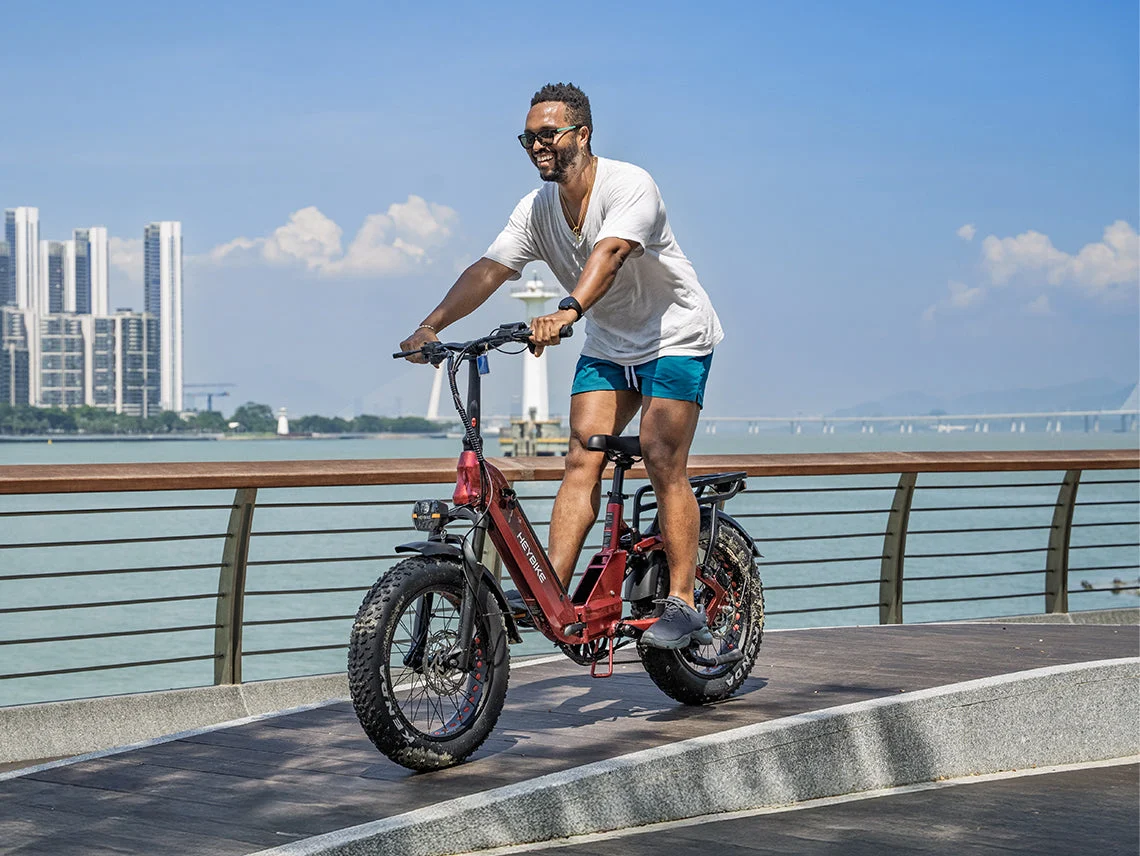
Input photo of a man in a white T-shirt and blue shorts on a bicycle
Input photo
Result
Team-generated sample

From bike ride to wedding dance

One photo in, a 5-second dance out. Made by our team.

See how it was made

Add one photo

One clear adult or pet photo. Keep the face and some of the body visible.

2. Choose a dance setting

Your photo supplies the person or pet. The dance you pick supplies the moves and camera. Other settings remix its background; motion is not frame-exact.

3Settings

Loading video options…

Standard Mini / 480p / 5s: $9.90 once, or 5 standard attempts for $29.00. Other settings use the current credit quote.

Default: 5 seconds, 480p, vertical 9:16. Changing the model, resolution or length can change credit usage. Check the current quote before each new attempt.

AI party sound is requested with every video. It is not the BbY WOW recording.

No subscription needed · Download your video

Confirmed technical failure: credits consumed by that attempt are returned. A processing task is not yet a failure.

A completed result you dislike does not automatically return credits. Cash refunds are handled separately under the refund policy. Read the refund policy

The trend behind the dance

What Is Dime Dime Baby?

Dime Dime Baby is a dance trend linked to BbY WOW by KAROL G, Judeline and rusowsky. One popular meme uses a party clip: a dancer walks up, bites a concha, holds a straight-faced stare and dances off. A concha is a Mexican sweet bread.

The song also appears with other dance routines. Here, you make a new clip from your photo and a built-in dance reference clip. We do not insert you into the viral original footage or supply the song. The Dime Dime Baby AI video you get should be shared as an AI creation.

Photo
One adult or pet photo: JPG, PNG or WebP, up to 10 MB. We automatically add the selected built-in motion reference.
Result
A new MP4. Default: 5s, vertical 9:16 at 480p. Check available settings in the studio.
Price
$9.90 per standard Mini / 480p / 5s attempt, paid once. A confirmed technical failure returns the consumed credits; cash refunds follow the refund policy.
Dance
Guided by your photo and a built-in video reference. Alternate settings remix the background. The generated movement is not frame-exact.
Sound
No BbY WOW recording. Every video requests new AI party sound; add trend music in your posting app.
Not for
Not a baby-video maker: “baby” comes from the song. Photos of children, celebrities and public figures are not supported.
Read the trend guide

How it works

How to Make a Dime Dime Baby AI Video

Upload one photo, choose a setting and generate. We pair your photo with a built-in motion clip. The default is five seconds; every render is a new AI interpretation.

1. Upload one clear photo

Use your own photo, a photo of an adult who agreed, or a pet photo you may use. Keep the face clear. A wider crop gives the model more detail for the body and outfit.

JPG, PNG or WebP, up to 10 MB. One subject works best. You do not upload a video: we add the built-in dance reference automatically.

2. Pick the dance setting

Start with a five-second, 480p vertical clip. The reference guides the moves; garage, studio, garden and neon settings rebuild the background. Longer supported outputs can adapt the timing. Review your settings and credits first.

3. Watch, save and post

Play the whole result. Check the face, hands and turn, then download the MP4. If you want BbY WOW, add the sound in your posting app and align the beat there.

Give your dance a reason

Dime Dime Baby Video Ideas

The snack-table guest

Build the joke around arriving at the party just for dessert. Keep the walk-in calm and let the stare land before the exit.

Your pet takes the floor

Use one dog or cat photo for a playful dance. Skip the bread and keep the moves simple. Review paws and fur marks in the result.

The party entrance

Choose warm lights and a clear floor. Add your own caption after download for a birthday invite or a group-chat joke.

A simple garage groove

Want the dance without the snack? Use the garage or studio setting. A short clip gives a shoulder bounce and camera look more room.

Made by our team

See the videos we generated

Real AI video samples made by our team with a photo and a motion reference. Compare the input photo, clip length and reference template. Previews start muted; samples marked with sound can be turned on.

  • Team-generated sample

    From bike ride to wedding dance

    About 5 seconds · 480p · Sound on

    Input photo of a man in a white T-shirt and blue shorts on a bicycle

    Input photo

    Reference template
    Wedding entrance dance

    A cycling portrait becomes a wedding dance clip. The man steps forward, lifts a hand to his mouth, looks at the camera and turns away.

    See how it was made
  • Team-generated sample

    A garden party at sunset

    About 5 seconds · 480p · Silent display

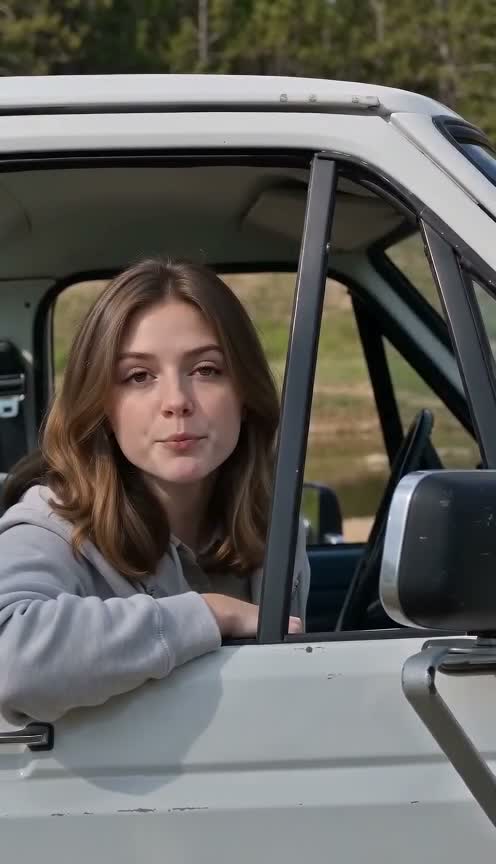
    Input photo of a brown-haired woman in a grey hoodie at a car window

    Input photo

    Reference template
    Wedding entrance dance · Garden remix

    The woman keeps her brown hair and grey hoodie. Wedding dance moves guide the action while the scene changes to a garden party at sunset.

    See how it was made
  • Team-generated sample

    A golden retriever joins the wedding

    About 5 seconds · 480p · Silent display

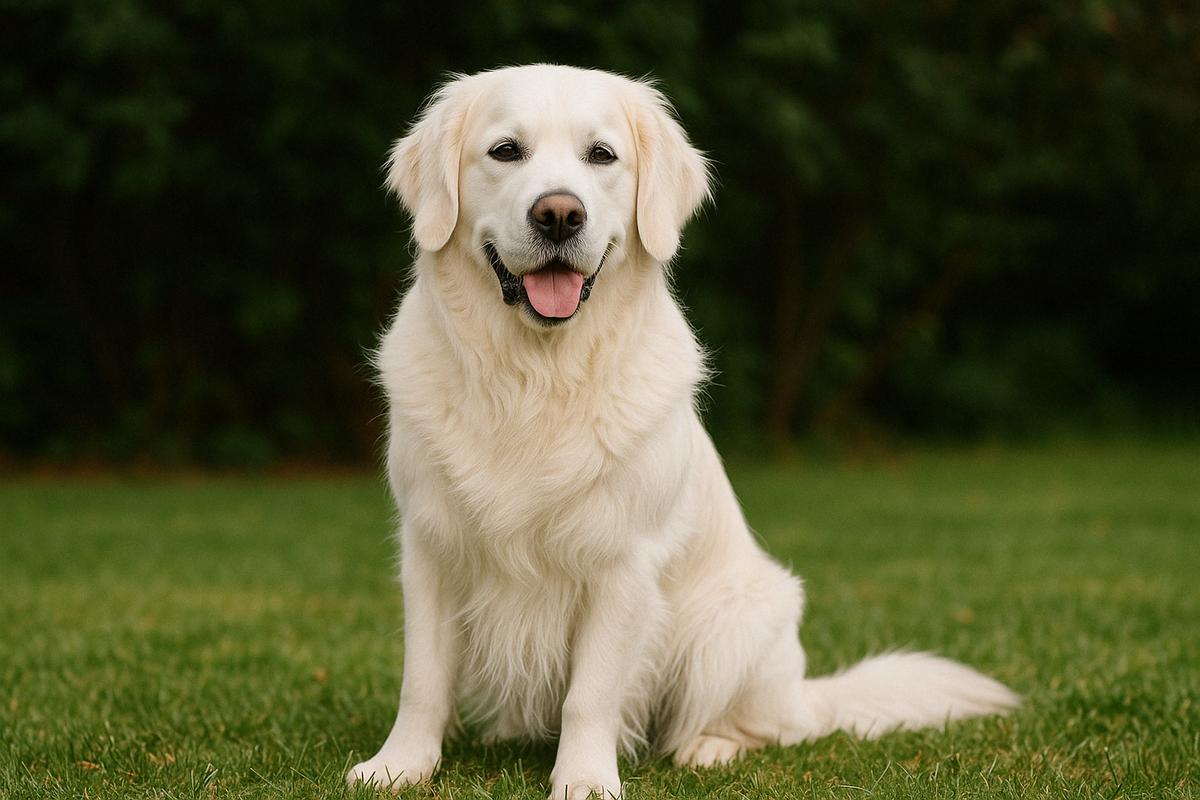
    Input photo of a golden retriever sitting on grass

    Input photo

    Reference template
    Floral-dress aunt at the wedding

    The golden retriever takes the lead in the pink wedding hall. It follows the aunt’s steps, raises a paw to its muzzle and pauses to face the camera.

    See how it was made
  • Team-generated sample

    Golden retriever and cat: a two-animal dance

    About 5 seconds · 480p · Silent display

    Input photo of the golden retriever sitting on grass used for the two-animal dance

    Input photo

    Reference template
    Pet dance · Dual-character reference

    A golden retriever photo and a two-character dance reference become a five-second pet video. The generated scene retains an orange cat companion.

    See how it was made

The Dime Dime Baby Dance in Four Beats

Use these beats to plan a Dime Dime Baby AI video. They describe the concha-meme version, not every routine that uses the song. The model may vary the steps, bite and timing.

  1. 1

    Walk toward the camera with small steps and a loose shoulder groove.

  2. 2

    Lift the concha and take one bite with the face still in view.

  3. 3

    Pause, chew with lips closed and look straight into the lens.

  4. 4

    Turn and dance away while the camera holds the shot.

Dime Dime Baby, BbY WOW or the Concha Meme?

NameWhat it refers to
Dime Dime BabyThe hook people use to name the trend. In Spanish, dime means tell me.
BbY WOWThe song title, credited to KAROL G, Judeline and rusowsky.
BbY WOW GuyA name used for the party dancer in the bread-bite meme.
Concha memeThe bite-and-stare version, named after the Mexican sweet bread.
Quince danceA party setting used by this meme; other BbY WOW dances use different scenes.

Make Your Own Take on the BbY WOW Trend

A short setup and a clear pause make the joke easy to read. For a Dime Dime Baby AI video, choose one subject and one main idea. Add a caption after download, keep the AI label where required, and choose music in the platform where you share.

Explore the meme and song

Listen: official BbY WOW visualizer. Song credit: KAROL G, Judeline and rusowsky. Linked for context; this service does not supply that recording.

Pricing

No Subscription Needed: Buy Once, or Subscribe and Save

Make your first video for $9.90, or get 5 videos for $29.00. No subscription required; plans are available for regular creation.

Make one video, or save with five attempts

One-time payment, no subscription. One standard Mini/480p attempt defaults to 5 seconds; supported lengths up to 15 seconds use the same standard allowance. The Starter Pack includes five standard attempts.

Single Meme

1 video

$9.90

Default 5 seconds, 480p; supported lengths up to 15 seconds

  • ✓ Preview and download completed videos
  • ✓ Never expires
  • ✓ Track credits and usage in your account
  • ✓ Credits returned on technical failure
Most Popular

Starter Pack

Save about 41%

50 credits

$29.00

Up to 5 standard 5-second attempts

Buying 5 separately: $49.50. About $5.80 per standard attempt.

  • ✓ Preview and download completed videos
  • ✓ Never expires
  • ✓ Track credits and usage in your account
  • ✓ Credits returned on technical failure

Crew Pack

71%

350 credits

$99.00

Up to 35 standard 5-second attempts

  • ✓ Preview and download completed videos
  • ✓ Never expires
  • ✓ Track credits and usage in your account
  • ✓ Credits returned on technical failure

Studio Pack

78%

900 credits

$199.00

Up to 90 standard 5-second attempts

  • ✓ Preview and download completed videos
  • ✓ Never expires
  • ✓ Track credits and usage in your account
  • ✓ Credits returned on technical failure

Label Pack

83%

3000 credits

$499.00

Up to 300 standard 5-second attempts

  • ✓ Preview and download completed videos
  • ✓ Never expires
  • ✓ Track credits and usage in your account
  • ✓ Credits returned on technical failure

Packs never expire. Confirmed technical failures return consumed credits.

Read the refund policy

Subscriptions renew until canceled. Manage your plan in Billing; check the credit quote before each generation.

  • Link
  • Visa
  • Naver
  • UnionPay
  • Google Pay
  • Apple Pay

Payments are handled by our payment providers. We do not store full card numbers.

Prices are listed in USD. Confirm the payment method, currency, and final amount at checkout.

Why make it here

Simple to make, clear about what you pay for

  • Credits back for technical failures

    If a render fails for a confirmed technical reason, the credits go straight back to your balance.

  • A dance brief is already prepared

    Upload one photo and choose a setting. Add a short visual note if you want; there is no routine to film.

  • Made for your phone

    Works in any mobile browser and makes vertical 9:16 clips that are ready to post.

  • Your photo, only for your video

    Submission uploads your photo to storage and the selected AI provider. We do not use it as a public example. Contact support to request deletion.

FAQ

Dime Dime Baby AI Video FAQ

Photos, dance moves, music, credits and what to check before you share.

What is the Dime Dime Baby dance trend?

It is a set of dances and memes linked to BbY WOW. The concha version shows a party guest walking toward the camera, biting sweet bread, staring at the lens and dancing away. Our tool makes a new AI take from your photo; it does not reuse that footage.

What does dime dime baby mean?

Dime is Spanish for tell me. The repeated phrase means tell me, tell me, baby. It is the hook people use to find the song and the dance, rather than the song’s title.

What is the song called?

The track is BbY WOW by KAROL G, Judeline and rusowsky. Search for that title and the artist names in your posting app to find its sound page.

Is BbY WOW Guy the same as the concha meme?

Those names often point to the party clip with the bread bite and stare. BbY WOW also has other dance routines, so check the actual moves when you choose an idea.

Can I make a Dime Dime Baby AI video here?

Yes. Upload one photo, choose a scene and review the quote. We send your photo, the dance reference and a short written direction to the selected AI model. The result is a new interpretation; exact dance steps, face details and beat sync are not guaranteed.

Which dance settings can I choose?

Choose a party hall, garage, studio, garden party, neon floor or pet-party backdrop. These set the scene for your video. Results are AI-generated, not footage from those venues.

Does the download include the BbY WOW song?

No. The generator does not supply the song, its lyrics or an artist’s voice. Every video requests new AI party sound, and the result can still come back quiet. To use the trend sound, add it in your posting app and check its rules for your type of post.

Is this a face swap or motion-transfer template?

Your photo is combined with a built-in motion reference. The photo supplies the performer; the clip guides the movements and camera. Alternate settings remix the background. This is a newly generated video, not a guaranteed frame-by-frame copy.

Can I post the result to TikTok, Reels or Shorts?

You can download a successful MP4. Choose 9:16 for a vertical feed and check the crop before posting. Add captions and licensed platform audio in your editor. Follow the platform’s AI-label rules and keep a local copy of the file.

How long is the video and what quality do I get?

The default is five seconds, vertical 9:16 at 480p. The studio shows supported models, lengths and resolutions, along with the credit quote for your selection.

How much does a video cost?

$9.90 for one standard Mini / 480p / 5s attempt, or $29.00 for the Starter Pack of five standard attempts. Other settings can use more credits. Packs are paid once and never expire. Confirmed technical failures return consumed credits; completed results you dislike do not automatically return credits. Cash refunds follow the refund policy.

What can I learn from the dance examples?

Watch the steps, framing and party atmosphere, then describe the movement you want with your own photo. Each generation creates a new clip, so facial detail, motion and timing can vary.

Can I download my finished video?

Yes. Open a successful task in the result panel and use Download to open the returned video. If it plays in a new tab, use your browser’s save action. Save a local copy; file links are not promised to remain available forever.

Can I use a friend, baby, celebrity or pet photo?

Use your own photo, a consenting adult’s photo or a pet photo you have permission to use. Our current rules do not allow children, celebrities or public figures. Baby in the trend name does not mean that child photos are supported.

What happens if generation fails?

Once a generation is confirmed technically failed, consumed credits are returned. Processing or submission confirmation is not yet a confirmed failure. Check the saved task status. Each new generation is charged again. A completed result that you dislike is not automatically refundable; cash refunds follow the Terms.

Do I need a subscription, and can I cancel?

No. One-time offers are also available. If you choose a subscription, cancel renewal in Account Settings → Billing. Canceling renewal does not immediately end an already-paid service period. Review the plan’s credit rules and the Terms of Service before buying.

What should I check before uploading my photo?

Your photo may be saved in a browser draft. When submitted, it is uploaded to storage and sent to the selected AI service. Anyone with the media URL may access it. There is no fixed automatic deletion period. Removing a preview or closing the tab does not delete uploaded files. Contact support@dimedimebabyai.video to request deletion of your media and task records; see the Privacy Policy.

Will the dancer still look like me?

Your photo guides the face and outfit, but new poses can change fine details. Use even light and a clear view of the face. Check the start, stare and turn in your Dime Dime Baby AI video before sharing; one good frame does not prove the whole clip is consistent.

What if the bite or hands look strange?

A prop near the mouth is a hard part of this dance. Try a short groove with no bite, or ask for one small bite with the hand below the eyes. A new render costs credits, and a completed video is not automatically refunded for a visual detail you dislike.

Can I leave the page while it generates?

Once a saved task is processing, you can return through your creation history. Avoid clicking Generate again to check progress: that starts a new attempt. There is no fixed completion-time promise. A processing task is not yet a failure; open the existing record and check its status.

Should I retry or change the settings?

Change one thing at a time. Try a clearer photo for face drift, a short groove for awkward hands, or fewer props for a busy frame. Review one take before spending on more. Repeating the same brief does not guarantee a better dance.

Read the photo-to-video tutorial

Your Photo. Your Dime Dime Baby AI Video.

Choose a dance setting, check the quote and make your own party moment. Save the clip, then add your caption and music where you share it.